制作清晰的 LaTeX 表格
用可读的列、单位、横线、标题和标签展示研究数据。
本页内容
读者需要精确数值或比较时,适合使用表格。好的研究表格应说明测量对象,在表头标注单位,对齐可比数值,并且不依赖竖线或过小字号维持可读性。
制作简短结果表#
tabular 的列规格决定对齐:l 为左对齐,c 为居中,r 为右对齐。用 & 分隔单元格,用 \\ 结束一行。每行单元格数应一致。
\documentclass{article}
\usepackage{booktabs}
\begin{document}
\begin{center}
\begin{tabular}{lrr}
\toprule
Method & Accuracy & Time (s) \\
\midrule
Baseline & 0.82 & 14.2 \\
Proposed & 0.89 & 11.7 \\
\bottomrule
\end{tabular}
\end{center}
\end{document}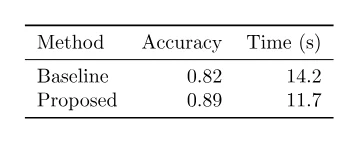
数值仅供教学示例,不是实验证据。booktabs 提供简洁的横线。秒等单位放在表头,不要在每个单元格重复。同一列通常使用一致精度,除非精度本身有含义。
添加标题和引用#
tabular 绘制表格内容,table 负责放置、编号和标题。标签放在标题之后,才能获得表格编号。
Table~\ref{tab:runtime} compares the two methods.
\begin{table}[htbp]
  \centering
  \caption{Validation accuracy and mean inference time.}
  \label{tab:runtime}
  \begin{tabular}{lrr}
    \toprule
    Method & Accuracy & Time (s) \\
    \midrule
    Baseline & 0.82 & 14.2 \\
    Proposed & 0.89 & 11.7 \\
    \bottomrule
  \end{tabular}
\end{table}
正文应总结结论,而不是逐个复述单元格。标题应说明理解数据所需的人群、条件或统计量。
对齐数字并让文字换行#
投稿模板允许时,可用 siunitx 对齐小数和单位。它的 S 列按小数点对齐并统一格式。说明性文字适合固定宽度 p{...} 列或 tabularx,不要把长段文字硬塞进 l 列。
以下完整示例让说明列使用可用宽度,同时按小数点对齐测量值:
\documentclass{article}
\usepackage{booktabs,siunitx,tabularx,threeparttable}
\begin{document}
\begin{table}[htbp]
  \centering
  \begin{threeparttable}
  \caption{Validation results across two calibration methods.}
  \label{tab:calibration}
  \begin{tabularx}{\linewidth}{
    >{\raggedright\arraybackslash}X
    S[table-format=1.2(2)]
    S[table-format=2.1]
  }
    \toprule
    Method and evaluation condition & {Accuracy} & {Time (s)} \\
    \midrule
    Baseline with default threshold & 0.82(3) & 14.2 \\
    Proposed method after calibration & 0.89(2) & 11.7 \\
    \bottomrule
  \end{tabularx}
  \begin{tablenotes}\small
    \item Values in parentheses are bootstrap standard errors.
  \end{tablenotes}
  \end{threeparttable}
\end{table}
\end{document}
编译后,确认两列数值对齐、文字自动换行且不越过页边距,并可通过 Table~\ref{tab:calibration} 引用 Table 1。数值列的表头文字外的花括号避免 siunitx 将文字当作数字解析。1.2(2) 为两位小数及括号内不确定度预留空间;请按实际报告精度调整。这里 0.82(3) 表示测量值为 0.82、不确定度为 0.03,而不是 0.3。应像示例表注一样说明不确定度的含义。threeparttable 让表注跟随表格,而不是藏在正文中。
需要跨页表格时,可以使用可选的 longtable 布局。它替代外层 table 浮动体,并明确指定重复表头:
\usepackage{booktabs,longtable}
% in the document body
\begin{longtable}{lr}
\caption{Measurements by specimen.}\label{tab:specimens} \\
\toprule
Specimen & Response (mV) \\
\midrule
\endfirsthead
\toprule
Specimen & Response (mV) \\
\midrule
\endhead
S01 & 12.4 \\
S02 & 11.9 \\
% continue with the remaining rows
\bottomrule
\end{longtable}
期刊模板已经规定表格样式时,应遵循模板。除非表头层级确有需要,否则尽量不合并单元格;简单行列、真正的表头和合乎逻辑的阅读顺序更容易理解,也更方便无障碍标记。视觉整齐本身不证明阅读顺序无障碍。
修复超宽表格#
不要一开始就用 \resizebox 或极小字号缩小整张表。先尝试:
- 删除冗余文字,将细节移到标题或表注。
- 把单位放在表头,缩短重复标签。
- 文字列允许换行,数字列按小数点对齐。
- 将不相关测量拆为多个表格。
- 仅在投稿方允许时使用横向或跨双栏表格。
编译,以正常阅读尺寸检查 PDF。内容不越过页边距、表头能够解释各项数值,且正文可以按编号引用表格时,即完成检查。接下来学习浮动体和图注,或用盒子溢出指南排查宽度问题。