Search and replace across a project
Find text across accessible files and preview broad replacements before applying them.
Press ⌘⇧F on macOS or Ctrl+Shift+F on Windows and Linux to search every editable text file you can access. Use match case, whole word, or regular expressions to narrow the results. Press ⌘F or Ctrl+F to search only the active file.
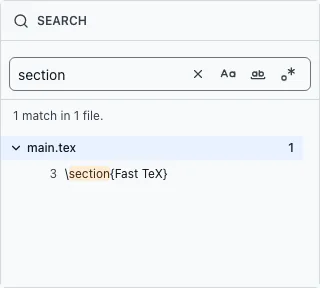
Review replacements#
Replace one match, one file, or the whole project. Project-wide Replace All requires owner or full-project editor access. It previews changes file by file and lets you exclude individual matches before applying them. Regular expressions can match broadly, and truncated results cannot be replaced; narrow the query until the preview is complete.
Recover a broad edit#
Before a large replacement, save a named version in Version history. The result screen can undo that Replace All operation during the same session, but the undo option is lost after a reload, project switch, or new review. Use version history to recover later or from unrelated project-wide changes.