Cross-reference sections, equations, and floats
Label numbered research objects once and keep every reference correct as the manuscript changes.
On this page
Labels connect a stable source name to a numbered section, equation, figure, or table. References resolve that name to its current number, so reorganizing the paper does not leave numbers typed by hand out of date.
Label what you will cite#
Put \label after a section command, inside a numbered equation, or immediately
after a float caption.
\documentclass{article}
\usepackage{amsmath}
\begin{document}
\section{Model}\label{sec:model}
The relation in Equation~\eqref{eq:line} defines the model.
\begin{equation}\label{eq:line}
  y = ax+b
\end{equation}
See Section~\ref{sec:model} for the assumptions.
\end{document}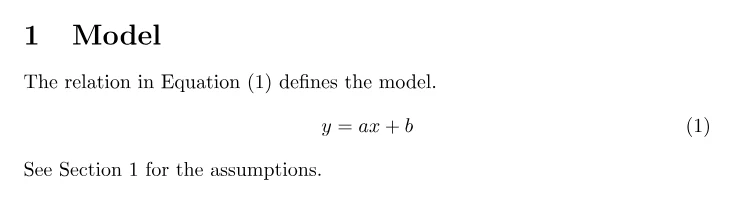
Prefixes such as sec:, eq:, fig:, and tab: are conventions, not printed
text. Use names that remain meaningful when the order changes, such as
fig:calibration rather than fig:three.
Use \eqref{eq:line} when an equation number should include parentheses and
\pageref{sec:model} when the page itself matters. A nonbreaking space in
Figure~\ref{fig:calibration} keeps the label and number together.
Refer to several related equations#
Place a label on the exact numbered line you discuss. subequations is useful
when a set should appear as 4a, 4b, and so on.
\begin{subequations}\label{eq:model}
\begin{align}
  y_i &= \alpha + \beta x_i + \epsilon_i, \label{eq:model-mean} \\
  \epsilon_i &\sim \mathcal{N}(0,\sigma^2). \label{eq:model-noise}
\end{align}
\end{subequations}
The prose can cite the group with \eqref{eq:model} or one line with
\eqref{eq:model-noise}. Keep punctuation in the equation or surrounding
sentence so the displayed mathematics reads as part of the prose.
Use editor navigation#
CorTeX completes known labels, citations, included files, and commands from the project. Use go to definition to inspect the labeled source. A reviewed rename can update recognized references across files; inspect its per-file preview before applying it, especially when a label name also occurs in plain text or a custom macro.
Fix an unresolved or wrong reference#
LaTeX writes label information to auxiliary files and may need another pass.
CorTeX performs normal reruns automatically. If ?? remains in the PDF:
- compare spelling and capitalization at
\labeland\ref; - search for a duplicate label and give each object a unique name;
- confirm the file containing the label is included by the main document;
- start with the first compile error, which may have stopped the label pass;
- confirm you are viewing the latest successful PDF, not a stale preview.
The hyperref package adds links and provides the \autoref command for
object names; cleveref offers further reference formatting. Use the package and configuration already chosen by the venue
template; do not mix reference styles casually. Finish by checking that no ?? markers remain and every cited number refers
to the intended object; with hyperlinks enabled, test its destination too. Continue with
citations and bibliographies for
references to external literature.