Cite from your library
Find Library papers while typing a LaTeX citation and keep the bibliography as ordinary project files.
On this page
Turn a paper you have read into a citation without retyping its bibliographic
entry. Your Library is personal and independent of projects; the bibliography
written into a project remains an ordinary .bib file that coauthors can use.
Save a paper in My library and open a project where you can edit the manuscript and bibliography. A PDF attachment is not required for citation.
Insert a citation while writing#
- Open the LaTeX manuscript in a writable project.
- Type
\cite{and begin entering a title, author, or citation key. - In the citation picker, inspect the title, authors, year, and key. It combines
entries from the project's
.bibfiles with matches from My library. - Choose the intended entry. For a new Library citation, CorTeX first writes
its bibliographic entry into the project, then inserts the key into the
editor after that operation succeeds. For a paper whose key is
Kim2026Evidence, the result is\cite{Kim2026Evidence}.
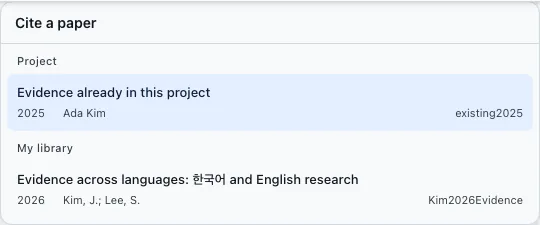
For example, cite a paper about a measurement method immediately after the sentence that uses its definition, not merely at the end of an unrelated paragraph. Check that you selected the right edition and authors: similar titles are not proof that two records refer to the same work.
Connect the bibliography once#
New Library entries are written to shared/refs.bib. If the document does not
yet include that file, CorTeX may propose a bibliography setup change; review it
before accepting. If the manuscript already names another bibliography, the
setup may be left unchanged with no dialog. Follow the existing system:
- BibTeX: add
shared/refsto the existing\bibliography{...}list. - biblatex: add
\addbibresource{shared/refs.bib}to the preamble.
Do not add a competing bibliography configuration.
These paths assume the main .tex file is at the project root. For
paper/main.tex, use ../shared/refs with BibTeX or
\addbibresource{../shared/refs.bib} with biblatex. Resolve the path from the
paper's root file, as in multiple-paper projects.
For a conventional BibTeX document at the project root, the commands might be:
\bibliographystyle{plain}
\bibliography{shared/refs}
Do not paste those commands into a biblatex project. Follow Citations and bibliography for the appropriate setup. Compile and confirm that the citation resolves to an entry in the rendered bibliography, not a question mark.
If writing the bibliography fails, resolve the reported permission or file
problem before retrying. Selecting a Library paper is not permission to modify
a file that has not been shared with you. If the picker shows no Library
matches, confirm that you are signed in and the paper appears in My library.
Project bibliography entries remain usable when Library lookup is unavailable;
you can also paste an entry copied with Copy BibTeX into the appropriate
.bib file if you have permission to edit it.
Keep keys and metadata understandable#
The Citation key in the paper details is the identifier inside \cite{...},
not the paper title or a DOI. Check imported metadata before relying on it in
a submission. If a key is renamed, Previous keys preserves earlier names
as aliases; those names can still matter to manuscripts already using them.
Imported bibliography entries can retain their existing project keys. CorTeX
marks entries it manages with % cortex:ref ...; unmarked entries and comments
are not automatically rewritten. Later metadata changes can be offered for
review when you open a project, rather than silently replacing your bibliography.
Copy or share the result#
For another editor, use Copy BibTeX in the paper details or the paper list's context menu. Select several papers before opening that menu to copy their entries together. Pasting the result elsewhere does not establish automatic synchronization with your Library.
Coauthors, project ZIP exports, and external LaTeX tools can use the project's
.bib file without access to your Library. Sharing the manuscript does not
share your saved PDFs or personal memos. Before submission, check author names,
year, venue, identifiers, and the final bibliography style in the compiled PDF.
Then check the submission package, including
the .bib file and the correct path from each submitted manuscript.