Write your first LaTeX document
Start with a complete document, compile it, and understand the essential structure of a standalone LaTeX file.
On this page
By the end of this lesson, you will have a one-page research note with a title, an abstract, a section, and an equation. You need only a web browser: open the example as a temporary project, or create a LaTeX project and a file named main.tex.
Start with a complete research note#
A standalone LaTeX file has two parts. The preamble, before \begin{document}, selects the document class and settings. The document body contains everything that can appear in the PDF.
\documentclass{article}
\title{A Simple Model of Cooling}
\author{A. Researcher}
\begin{document}
\maketitle

\begin{abstract}
We describe the temperature of a sample as it approaches ambient conditions.
\end{abstract}

\section{Model}
If the cooling rate is proportional to the temperature difference, then
\[
  T(t) = T_{\mathrm{room}} + \Delta T_0 e^{-kt}.
\]
The parameter \(k>0\) controls how quickly the sample cools.
\end{document}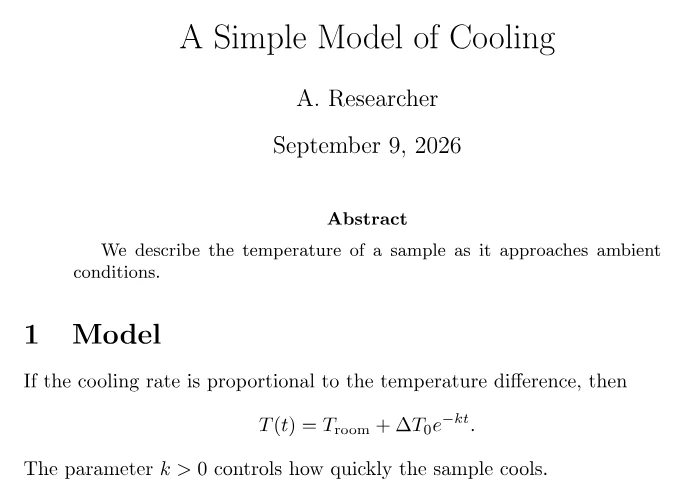
\documentclass{article} selects LaTeX's standard article layout. \title, \author, and \maketitle create the title block. The matching \begin{document} and \end{document} lines enclose the visible document. The equation is between \[ and \], while the shorter expression \(k>0\) stays in its sentence.
Compile it in CorTeX#
Choose Open in CorTeX beside the example, or paste the source into main.tex in your project and open that file. To make it the project's opening default, optionally choose Set as main document from its file menu. Select Split to see source and PDF together, then wait for the automatic
compile. On a narrow screen, switch between Source and PDF.
You are done when the PDF shows the title and author, the abstract, a numbered “Model” section, and the displayed cooling equation. If the PDF does not update, open main.tex and start with the first message in the Problems panel. The compilation guide explains the full preview workflow.
Make one guided edit#
Change A. Researcher to your name, replace Cooling in the title with your own subject, and change k>0 to k\geq 0. Compile again and confirm all three changes appear. Keep command names, braces, and the backslash before geq; plain >= does not
produce the same mathematical symbol. This also changes the model assumption:
k=0 allows no cooling, so check the surrounding explanation as well as the glyph.
The next lesson, commands and environments, explains the syntax you just used.