Add citations and a bibliography
Connect citation keys to a BibTeX database and run the bibliography workflow required by your venue.
On this page
Store literature as keyed records and cite the keys from the manuscript. LaTeX then keeps markers and the reference list synchronized when citations are added, removed, or reordered.
After sign-in, the Library citation picker can add saved papers to an ordinary project
.bib file. Using Library is optional: the file-based workflow below works
without it, and coauthors do not need access to your personal Library.
Understand citation keys#
All references on this page are fictional teaching examples, including the
journal and DOI in the .bib record. Replace them with verified literature
metadata before using the pattern in a manuscript.
This small self-contained example shows the connection between \cite{example}
and \bibitem{example} without a separate database.
\documentclass{article}
\begin{document}
Reproducible research depends on clear records~\cite{example}.
\begin{thebibliography}{9}
\bibitem{example}
A. Researcher, \emph{A Reproducible Study}, 2026.
\end{thebibliography}
\end{document}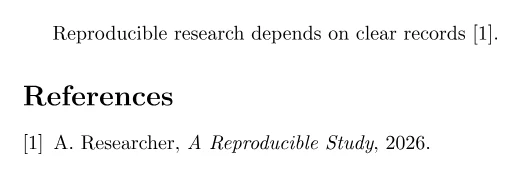
The key is internal and does not appear in the PDF. Choose stable keys such as
smith2025calibration; changing a key later requires changing every citation.
Follow the venue's bibliography system#
Do not choose a bibliography package only by personal preference. A journal or
conference template may require a style, package, and backend. Keep that
workflow intact unless the venue explicitly permits a change. A starter from
the Template library may already select
that system; inspect it before adding another. The Template library supplies document
formats, while your .bib file holds literature records.
For a traditional BibTeX workflow, create references.bib:
@article{smith2025calibration,
  author  = {Smith, Ada and Chen, Bo},
  title   = {Calibration under distribution shift},
  journal = {Journal of Reproducible Models},
  year    = {2025},
  volume  = {12},
  pages   = {41--58},
  doi     = {10.1234/example.2025.17}
}
For BibTeX, use this complete main.tex and replace plain only when the
template names another style:
\documentclass{article}
\begin{document}

Earlier work studied this shift~\cite{smith2025calibration}.

\bibliographystyle{plain}
\bibliography{references}
\end{document}
Compile the main document. A successful run completes LaTeX, BibTeX, and the
necessary later LaTeX passes automatically; the PDF contains a resolved marker
such as “[1]” and one bibliography entry rather than ?.
For biblatex with Biber, keep the same references.bib and use this separate
complete main.tex:
\documentclass{article}
\usepackage[backend=biber,style=numeric]{biblatex}
\addbibresource{references.bib}
\begin{document}

Earlier work studied this shift~\cite{smith2025calibration}.
\printbibliography
\end{document}
A successful run here completes LaTeX, the bounded Biber helper stage, and the
later LaTeX passes. The visible success condition is the same: a resolved
citation and a current bibliography containing the record from references.bib.
These are separate systems. Do not combine \bibliography with
\addbibresource, or BibTeX style commands with a biblatex setup. CorTeX runs
supported BibTeX or Biber stages when the main document requests them; you do
not run the helper manually.
Keep records usable#
Use the entry type that matches the source and preserve the metadata required by the venue. Author, title, year, and publication fields are usually essential; DOI, URL, issue, pages, editor, or publisher depend on the source. Keep DOI data as an identifier rather than writing a prose URL into the citation.
Protect capitalization that a bibliography style must retain with braces, for
example {DNA} or {Bayes}. Preserve names in Family, Given or a consistent
BibTeX-compatible form. Do not paste a formatted reference list into a .bib
file: it needs structured records.
Citation commands vary by package and style. Numeric templates often use
\cite; author–year packages may provide commands for textual and parenthetical
citations. Follow the template documentation so “Smith et al. (2025)” and its
parenthetical form are semantically correct.
Diagnose missing citations#
After changing a .bib file, compile the main document and inspect the first
bibliography warning. If a marker remains undefined:
- confirm the citation key exactly matches one record;
- confirm the
.bibpath is relative to the main document and the file is in the shared project scope; - verify that the document uses one coherent BibTeX or Biber workflow;
- check that the requested style and packages exist in the selected TeX Live snapshot;
- fix an earlier LaTeX error that may have prevented the helper stage.
A Biber helper failure may leave the document compilable with an empty or stale bibliography and a Problem warning. Do not treat the visible PDF as complete until every cited key is resolved and the reference list matches the latest database. For a clean project layout, continue with multi-file LaTeX projects.