Fix overfull and underfull box warnings
Locate material that crosses a margin or stretches too loosely, then repair the local cause.
On this page
An overfull box exceeds its allotted horizontal or vertical space. This guide focuses on common horizontal overflow. An underfull box has spacing LaTeX considers too loose. Both are warnings rather than fatal errors, but they can reveal clipped text, unreadable tables, or distracting gaps in a manuscript.
Find the affected output#
Start with the first reported line range and inspect the newest PDF near that
paragraph, table, equation, caption, or URL. Add \overfullrule=4pt temporarily
to the preamble to draw a black marker at overfull line edges.
This example contrasts an unbreakable identifier with a version that provides meaningful break points:
\documentclass{article}
\begin{document}
\overfullrule=4pt
\noindent
\begin{minipage}{0.42\linewidth}
Unbroken: \mbox{calibration-result-without-breakpoints}

Revised: calibration result with ordinary break points
\end{minipage}
\end{document}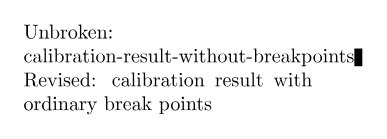
The marker helps locate the pressure; remove \overfullrule after the repair.
An overfull warning can be invisible at a casual zoom, so check the stated line
even when the page initially looks acceptable.
Fix the local cause#
Choose a repair that preserves meaning and the venue layout:
- Rewrite awkward prose or a long heading to create natural break points.
- Use a suitable URL or path command for a long address or identifier.
- Break a derivation at meaningful relations with an
amsmathenvironment. - Redesign a wide table with shorter headings, wrapping columns, or fewer genuinely related measurements.
- Scale or crop a figure to the available
\linewidthwithout distorting it.
Do not insert arbitrary \\ commands into prose or shrink all document text to
solve one line. For source identifiers that must remain exact, provide deliberate
break points with a package or command supported by the template.
Interpret underfull warnings#
Underfull warnings often follow forced line breaks, narrow columns, sparse table
cells, or short justified lines. Remove unnecessary \\ and manual spacing
before changing LaTeX's paragraph settings. A small underfull warning may be
harmless if the visible result is balanced; a line with very wide word spaces is
not.
Treat global \sloppy, large \emergencystretch, or broad tolerance changes as
document-level typography decisions. They trade one class of warning for looser
spacing throughout the paper and should match the venue's expectations.
Compile again and inspect the exact page at normal reading size. Success means no content crosses or is clipped by the margin, tables and equations remain legible, and the warning is either gone or visually justified. For a warning caused by a table, continue with Create clear LaTeX tables; for a mixed error log, use Solve LaTeX compile problems.