Write lists and control spacing
Create ordered and unordered lists, paragraphs, and deliberate line breaks without fragile manual spacing.
On this page
Lists should expose the logic of a method or argument, while spacing should come mainly from the document class. The reliable defaults are simple: \item for list entries, a blank source line for a paragraph, and very few manual breaks.
Choose the list that matches the content#
itemizepresents points without an inherent order.enumeratepresents a sequence or ranked set.descriptionpairs terms or stages with explanations.
\documentclass{article}
\begin{document}
The analysis followed three steps:
\begin{enumerate}
  \item preprocess the observations;
  \item fit two candidate models;
  \item compare them using
    \begin{itemize}
      \item held-out error, and
      \item calibration slope.
    \end{itemize}
\end{enumerate}

\begin{description}
  \item[Primary outcome] Root-mean-square error.
  \item[Sensitivity check] Fit after removing outliers.
\end{description}

This blank source line starts a new paragraph. The class chooses the separation.
\end{document}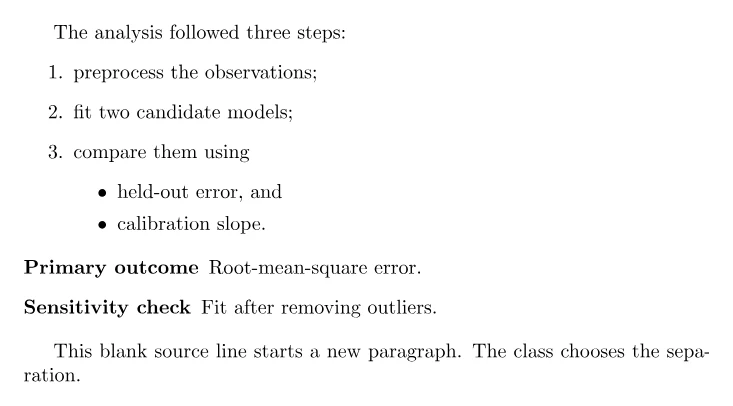
The PDF should show a numbered workflow, one nested bullet level, a term–description list, and a separate final paragraph. \item[Replication.] can override one label in itemize or enumerate, but description is clearer when every item has a named term.
Distinguish paragraphs from line breaks#
A blank source line starts a paragraph. A single source newline usually behaves like a space. \\ forces a line break but does not start a paragraph; reserve it for structures that define rows, such as align or tabular, or for deliberately line-broken material such as an address. Do not end ordinary prose lines with \\.
Avoid empty \items and reconsider deeply nested lists or a list with only
one short sentence. Four levels are possible in standard lists, but a paragraph
or descriptive heading often communicates the hierarchy more clearly.
Make only local, justified spacing changes#
Commands such as \smallskip, \medskip, and \bigskip provide class-aware vertical space, while \, gives a thin space in mathematics. Use them only when the semantic environment cannot express the relationship. Repeated \\, empty lines made from \vspace, and negative spacing are fragile: a journal class, two-column layout, or revised paragraph can turn them into gaps or collisions.
If a publisher specification requires different list spacing, use the template's documented setting or a list package configured once in the preamble. If content enters the margin, fix the content or source of the overfull box instead of hiding it with breaks.
Try adding a third description item named “Data exclusion,” then rewrite the nested bullets as one sentence. Compare which form makes the protocol easier to scan. Next, learn how spacing changes inside mathematics.