Fix LaTeX file-not-found errors
Find a missing project asset, bibliography, class, package, or generated input from the path LaTeX requested.
On this page
A file-not-found error means the compiler could not resolve one requested name from the project or the selected TeX Live snapshot. The file may exist under a different path, case, extension, or project scope; it is not always absent.
Classify the requested file#
Start with the first Problem and note the exact requested name and the current paper's root file. In a multi-paper project, the project opening default may be a different document. The extension suggests who owns the repair:
| Requested input | First place to check |
|---|---|
.tex |
Included section or shared macro file in the project |
| image extension | Uploaded figure path and engine-compatible format |
.bib or bibliography output |
Bibliography database and BibTeX/Biber workflow |
.sty, .cls, font, or format |
Venue files or the selected TeX Live snapshot |
| generated index/bibliography file | An earlier helper-stage warning or source error |
Use the CorTeX file tree as the authority for project-owned files. An item on your computer is not available until it is uploaded or included in the import.
Compare the path exactly#
Project paths use / and are case-sensitive. Relative LaTeX paths start from
the main document's folder, not the folder of an included section.
paper/
  main.tex
  sections/results.tex
  figures/calibration.pdf
From paper/main.tex, both the section and a figure referenced inside it use
paths relative to paper:
\input{sections/results}
\includegraphics{figures/calibration.pdf}
This fails when the actual file is lower-case:
\input{Results} % The project contains results.texThe corrected self-contained example uses the exact name:
\begin{filecontents*}{results.tex}
\section{Results}
The included file was found.
\end{filecontents*}
\documentclass{article}
\begin{document}
\input{results}
\end{document}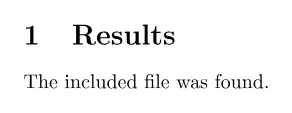
Check spelling, capitalization, folder names, and extension. Omitting .tex is
normal for \input; omitting an image extension lets the engine select among
supported formats, which can be confusing if several files share a base name.
Use \graphicspath only when a consistent figure root genuinely simplifies the
project, and document that convention for coauthors.
Check imports, packages, and helper stages#
An import review reports unsafe paths, symlinks, conflicts, and oversized files
that were skipped. Return to that report or upload the missing safe dependency.
For .sty and .cls files, determine whether the venue supplied the file or TeX
Live should supply it. Compare template-owned files against the official kit or Library
source and upload missing ones. For distribution-owned
packages, check the package name and selected snapshot rather than downloading a
random copy into the project.
Bibliography and index inputs may be consequences of an earlier error. Fix the first LaTeX, Biber, BibTeX, or Xindy Problem before trying to create an auxiliary file by hand.
CorTeX updates recognized file references when a file is renamed or moved. Review references built through custom commands, computed paths, or plain text, because they may still point to the old location. In a scoped share, also verify that the reader has access to every included file and image; compilation cannot reveal an unshared dependency.
Compile from the intended main document. Success means the missing-input Problem is gone and the newest PDF contains the expected section, figure, bibliography, or class formatting. Continue with multi-file project organization to prevent path drift.